We’ve launched a new feature on Helpful Games that makes it easier than ever to let your students play your custom games – without them needing to log in or have an account.
What are pin-code-locked games?
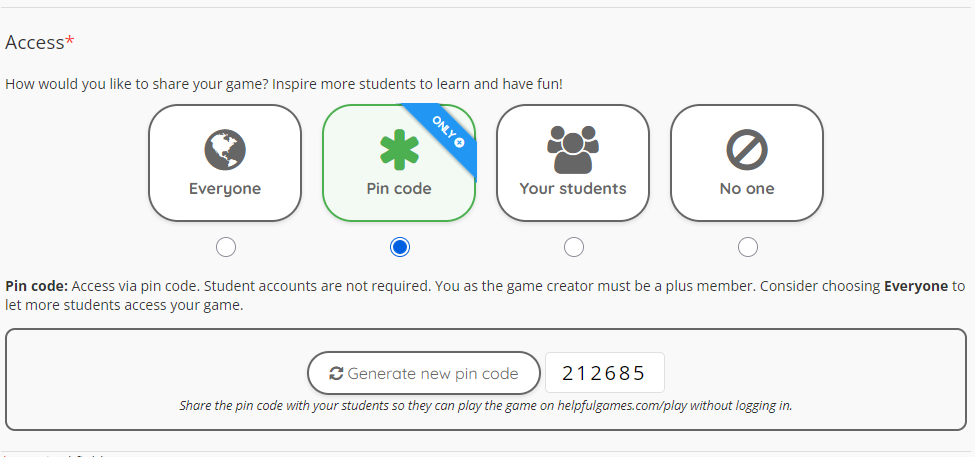
As a teacher with a plus membership, you can now protect your own games with a six-digit pin code. Share the code with your students, and they can go straight to helpfulgames.com/play/, enter the code and start playing – no login required!
How does it work?
- Create or edit a game as usual via Own Games.
- In the final step, choose “Pin code” as the access level instead of “All” or “Your students”.
- A unique pin code is generated automatically – click Generate new pin code if you’d like a different one.
- Share the code with your students – on the board, via a projector, or on a handout.
- Students go to helpfulgames.com/play/, enter the code and they’re ready to go!
You can also display a QR code directly on the game page – students scan it with their phone and are taken straight to the game. Perfect for projecting in the classroom!
Why pin-code-locked games?
Sometimes you have a game tailored to a specific group of students, a local theme, or an ongoing topic – one that isn’t suitable for public sharing. With the pin code feature, you stay in full control:
- Students don’t need an account
- No student logins
- The game won’t appear among the public games
- Easy to share via code or QR
Who can use this feature?
Pin-code-locked games are available to teachers with a plus membership. Not a plus member yet? Compare memberships to see what’s included.
Have questions or feedback about the new feature? We’d love to hear how it works in your classroom!